In cybersecurity, Security Operations Centre (SOC) teams are often trying to be do more with less. The reality is that analysts are sifting through thousands of alerts every single day. The human brain, as brilliant as it is, can only realistically investigate a fraction of these. This isn't just a challenge; it's a crisis leading to alert fatigue, widespread burnout, and alarmingly long attacker dwell times – often exceeding 200 days in many industries.
But what if there was a way to turn the tide? What if your skilled analysts could focus on strategic threat hunting and adversarial reasoning, instead of the mundane, repetitive tasks that consume their days? Artificial Intelligence (AI) and automation are well suited to help improve efficiency and can be very transformative.
Why Automation is Now Table Stakes
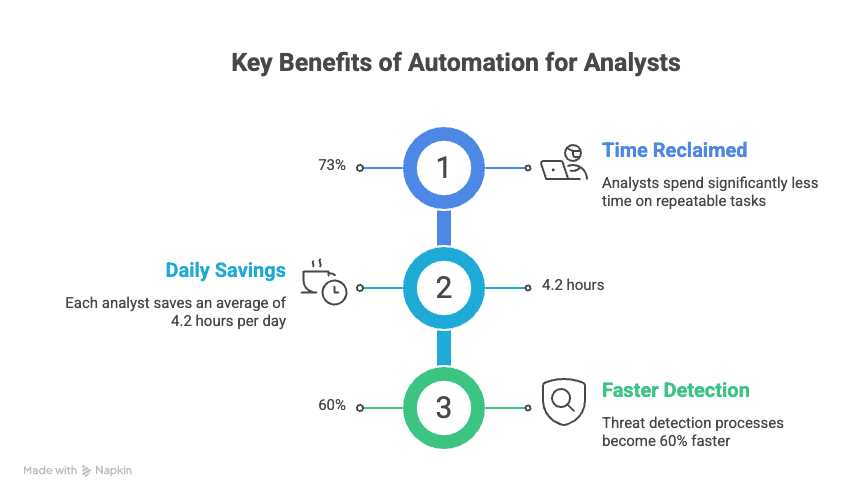
A significant portion of a security analyst's day is spent on predictable, structured work. Think log parsing, IP lookups, CVE scoring, and email header analysis. These are precisely the tasks where AI excels. The goal isn't to replace your invaluable human talent, but to empower them, making each analyst dramatically more effective.
"The goal isn't to automate the security team out of existence. It's to eliminate the toil so analysts spend their hours on adversarial reasoning, not copy-paste." - Common wisdom in modern SOC design
The 6 Tasks You Should Automate First
Not all automation yields equal returns. To maximise impact, start with high-volume, low-ambiguity tasks where errors are easily recoverable. Here are six key areas to focus your initial 90-day efforts:
1. AI-Powered Log Triage
Log triage is the quintessential example of necessary yet often monotonous security work. Your Security Information and Event Management (SIEM) system generates thousands of events hourly, most of which are noise. This signal-to-noise problem is, at its heart, a machine learning challenge.
A practical AI log triage pipeline typically involves three layers:
1.Normalisation Layer: Converts raw logs from diverse sources (e.g., Windows Event Logs, syslog, cloud audit trails) into a unified schema. Tools like Logstash or Vector are excellent for this.
2.Anomaly Detection Layer: Machine learning models (such as isolation forests, autoencoders, or context-aware LLMs) flag events that deviate from established baseline behaviour.
3.Triage & Enrichment Layer: Flagged events are automatically enriched with crucial context (e.g., IP reputation, user history, asset criticality) and assigned an AI-generated confidence score before reaching a human analyst.
2. Vulnerability Management Automation
With hundreds of new CVEs published weekly and thousands of open vulnerabilities across your estate, manual prioritisation is a Herculean task. AI can help you build a risk-adjusted vulnerability queue, moving beyond raw CVSS scores to consider actual exposure, exploitability, and asset criticality.
What to Automate:
•Continuous asset inventory reconciliation: Automatically tag assets by criticality and exposure.
•CVE enrichment: Pull exploit availability from EPSS, Proof-of-Concept (PoC) existence from ExploitDB, and active exploitation from CISA KEV.
•Contextual scoring: Implement formulas like adjusted_score = cvss * epss_score * asset_criticality * internet_exposure_factor.
•Auto-generate patching tickets: With full context and Service Level Agreements (SLAs) based on adjusted scores.
•Weekly AI-written executive summary: Providing an overview of your vulnerability posture.
Impact Metrics:
| Metric | Improvement |
| Triage speed | +88% |
| False positive rate | −65% |
| Patch SLA adherence | +72% |
3. Threat Intelligence Enrichment
Every time an alert fires, an analyst typically spends 20–30 minutes manually enriching it – looking up IPs in VirusTotal, checking domain age, searching internal tickets, and mapping tactics to MITRE ATT&CK. This is prime automation territory.
4. Phishing Triage & Response
Phishing reports are high-volume, repetitive, and time-sensitive. A well-trained AI pipeline can automatically process up to 90% of user-reported phishing emails, reserving human review for genuinely ambiguous cases.
Automated Phishing Playbook:
1.Parse the email: Extract headers (SPF, DKIM, DMARC results), sender domain, all URLs, attachments, and any embedded Indicators of Compromise (IOCs).
2.Reputation checks: Run URLs through Safe Browsing API, sender IP through threat feeds, and perform domain age checks via WHOIS.
3.LLM analysis: Ask the model to assess social engineering tactics, urgency indicators, impersonation targets, and provide a verdict with a confidence score.
4.Automated response: If confidence in maliciousness is high (> 0.85), automatically delete from all mailboxes, block the sender, create IOC block rules, and notify the reporter. Ambiguous cases are routed to an analyst queue with full pre-filled enrichment.
Human-in-the-loop requirement: Always require human approval before bulk-deleting emails or blocking domains. The cost of a false positive here is high. Set your automation confidence threshold conservatively (0.90+) and err towards analyst review.
5. Incident Report Drafting
Turning structured incident data into readable reports for stakeholders and compliance can be a time-consuming chore. AI can automate the drafting of these reports, ensuring consistency and freeing up analysts.
6. Access Review & Anomaly Detection
Monitoring user behaviour, flagging access creep, and generating review queues are critical for maintaining a strong security posture. AI can continuously analyse access patterns and highlight anomalies that require human attention.
Tools & Platforms to Know
You don't need to build everything from scratch. Here's an honest look at some of the key tools and platforms in the current landscape:
| Tool | Category | Best For | Cost |
| Tines | SOAR / Automation | No-code security workflows, phishing playbooks | Free tier |
| n8n | Workflow automation | Self-hosted, custom enrichment pipelines | Open source |
| LangChain | LLM orchestration | Building AI agents for triage and analysis | Open source |
| Microsoft Sentinel | SIEM + SOAR | Copilot-powered alert triage at enterprise scale | Paid |
| Elastic Security | SIEM | ML-based anomaly detection on log data | Free tier |
| Nuclei | Vuln scanning | Fast, template-driven automated scanning | Open source |
| Anthropic API | LLM backbone | Custom triage, report generation, enrichment synthesis | Usage-based |
Pitfalls to Avoid
Most automation projects falter not due to technological limitations, but because of common implementation mistakes. Here are the ones we see most often:
•Pitfall 1: Automating Without Baselines: If you lack a documented baseline of normal behaviour, your anomaly detection will constantly trigger false positives. Dedicate time to collecting and labelling data before automating.
•Pitfall 2: Over-Trusting LLM Outputs: Large Language Models (LLMs) can sometimes "hallucinate" threat intelligence, invent CVE details, or misattribute campaigns. Always ground your AI layer in external, verifiable data sources. Treat LLM output as a draft, not a definitive verdict.
•Pitfall 3: Skipping the Human-in-the-Loop for High-Impact Actions: Actions like blocking IPs, deleting emails, or disabling accounts require human approval gates. Reserve full automation for low-impact, high-confidence actions only.
•Pitfall 4: Neglecting the Feedback Loop: Your automation's effectiveness hinges on its training signal. Build analyst feedback directly into your User Interface (UI) – a "This was a false positive" button should update your model, not vanish into a void.
How to Start This Week
Don't attempt to automate everything at once. Instead, pick one high-pain, high-volume task and aim to build a working prototype within a week. Here's a concrete five-day plan to get you started:
•Day 1 — Audit Your Manual Work: Have every analyst meticulously track their activities for two hours. Catalogue tasks, volume, and time costs. This data is foundational.
•Day 2 — Pick Your First Automation Target: The task with the highest volume and lowest ambiguity is your winner. For most teams, this will be phishing triage or log pre-filtering.
•Day 3 — Build a Proof of Concept: Create a Python script that takes an example of the chosen task, calls an LLM API, and returns structured output. Focus on functionality, not polish.
•Day 4 — Add Guardrails and Logging: Implement confidence thresholds, human escalation paths, and comprehensive audit logging for every AI decision. These are non-negotiable before any production use.
•Day 5 — Run in Shadow Mode: Operate the automation in parallel with human analysts for a week. Compare outputs, fine-tune, and build trust. Only then should you cut over.
The Goal: Reclaim Your Analysts' Expertise
Within 90 days, your analysts should be spending less than 20% of their time on tasks that existed before AI. The remaining 80% will be dedicated to adversarial thinking, proactive threat hunting, and the critical work that truly demands human judgement and creativity.